- New Old Stock factory (OEM) GM Delco CD6 drive
- Manufactured by Panasonic for Delco
- Part number on board is:
- E-8586C-2, E-8586C-1, E-9058-1, E-9058-2 or equivalent
- You MUST match yours to one of these
- NOT compatible with the E-9060A-1 drive
- Often referred to as GM gen1 or v1 CD6 drive
- Has a single triangle shaped opening
- Above the CD trays
- Match your board number to one of those listed above
- Installation instructions are NOT included
- But basic ones appear below
Your drive MUST have the green board on top
- You will swap that board to this one
- See more details below
This is the truck, van and SUV drive.
A GREAT way to replace a CD6 drive that:
- Gives playback errors
- Won't load
- Won't eject
- Plays noisily
Only compatible with the CD6 radio
- am/fm radio with built-in 6 CD changer
Compatible with BOSE or non-BOSE CD6 radios
Not guaranteed compatible with remote CD Changer
Not compatible with navigation radios
Not compatible with single CD or CD/Cass radios
Not compatible with MP3 CD radios
Plays standard audio format CDs and CDRs
Will NOT trigger the THEFTLOCK system
- Plug your radio back in and go.
Has NEVER been in a vehicle!!
Will require removal of your radio from the vehicle
- Do not attempt with radio connected
Plug and play. No soldering or splicing required.
90 day warranty
DETAILS
Does your am/fm/cd6 radio have problems loading, ejecting and/or playing CDs? Does it give CD error messages on the radio display? Does it skip excessively? If it exhibits any of these problems, fix it with this brand new CD6 mechanism from ReplacementRadios!!
This is a
brand new 6 disc CD drive for select 2001-2002 GM Delco radios. Even though it looks like the same drive used in various other
applications (Ford, Nissan, Toyota, Audi, Hyundai, Honda, etc), this is
the GM version and they are not usually interchangeable. You will need
to pop the top case off your GM radio to verify yours has this drive
because some of the radios were offered with a different, incompatible
drive. If yours doesn't look
virtually identical to the drive pictured, it won't work for you. (Number stampings on top of the drive will vary, obviously. You will also have a narrow green circuit board on top, which will need swapped to this one.)
There will be no returns accepted on this item for any reason other than functional defect. Even then, only exchanges will be offered, not refunds, so please do your research BEFORE purchasing.
This drive might also appear identical to the mechanism used in the remote CD6 drive found in some vehicles. (Mounted below the radio.) However, we do not guarantee it for those applications either. It is only intended for
am/fm/cd6 radios that have a drive matching the picture. (With a green board on top, along the side.) Again, there will be no returns accepted for this item for any reason other than functional defect. Even then, only exchanges will be offered, not refunds, so please do your research BEFORE purchasing.
There were several other versions of this drive in GM radios as well.
They are not usually interchangeable.
Yours MUST have a green board on the top (which will get swapped to this) and must have one of the PCB board numbers listed above on the green board on the bottom of your drive. It is NOT compatible with drives that have a PCB number of E-9060A-1. Again, there will be no returns accepted for this item for any reason other
than functional defect. Even then, only exchanges will be offered, not
refunds, so please do your research BEFORE purchasing.
Installation is relatively easy but,
if you're not mechanically
inclined, you shouldn't be buying it. Some basic install instructions appear in a special section below. We provide these as a courtesy. Please don't hold it against us if you find there are slight differences in your application.
There is a 90 day warranty on this item. It covers functional defects only.
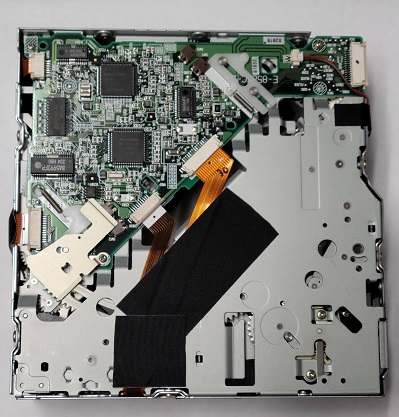
Board on the bottom
APPLICATIONS
Many 2001-2003 GM vehicles with am/fm/cd6 radios. The most important thing is that your drive matches one of the PCB board numbers provided above because returns are not accepted if you've made a mistake. ** Make sure to confirm this is the drive you
have BEFORE ordering. You will have to pop your top cover off, remove the face, remove the two screws holding the drive behind the face and remove the two screws holding the drive on the back of the radio. Then you can lift your drive out to check the PCB number. (See more detailed instructions below.)
In
very rare instances, you may find that replacing the drive does not solve your problem. Replacement of your radio might be your only option. Please be aware that we have no control over this. Nor do we have any way of predicting when this is going to happen.
REMOVAL/INSTALL INSTRUCTIONS
Instructions are not included but installation is relatively easy.
However, if you're not mechanically inclined, you shouldn't be buying
it. Basically, you remove the face by prying it off. Then you remove
two 3/16 hex screws holding the drive in from the front and two more from the
rear. The drive can then be lifted out (carefully) and the ribbon cable
pulled free of it. If there is a bracket attached to the back of your
drive and there isn't one on the drive you receive, you will need to swap it to the new one. Your top green circuit board will also need swapped to this one.
We provide these instructions as a
courtesy. Please don't hold it against us if you find there are slight differences in your application.
Do not attempt this repair with the radio still plugged in! You must unplug it from the vehicle wiring harness and let it sit for at least 30 minutes prior to opening it up!
Formerly our part number GMPCD6DSTB.
This product was last updated on Monday 01 June, 2026.